Configure Roles
Overview
Roles determine what members can see and manage within your community.
By assigning roles, you can control who can moderate discussions, manage content, organize events, or administer the community.
A clear role structure helps maintain organization, accountability, and smooth collaboration as your community grows.
Common Roles in a Space
Most communities start with a simple role structure.
Space Admin
Space admins have full control over the community.
They can:
manage space settings
create and manage subspaces
create and manage sections
invite and remove members
manage roles and permissions
moderate content
host events
Admins are responsible for the overall structure and management of the community.
Subspace Moderator
Subspace moderators help manage activity within specific subspaces.
They can:
manage subspace settings
create and remove sections within the subspace
moderate posts and comments
manage flagged content
pin or unpin posts
Moderators help keep conversations productive and organized.
Section Moderator
Section moderators manage activity within a specific section.
They can:
moderate posts and comments within the section
manage pinned posts
remove inappropriate content
help maintain discussion quality
Section moderators do not manage the entire subspace, only the specific section they are responsible for.
This role works well for sections such as:
Introductions
Product Feedback
Weekly Discussions
Resource Sharing
Member
Members are the standard participants in the community.
They can typically:
create posts
comment on discussions
join events
access shared resources
connect with other members
Most users in the community will have the Member role.
Event Host
Event hosts manage community events.
They can:
create events
edit event details
manage event registrations
host and run event sessions
This role is ideal for members who regularly organize events.
Event Co-host
Co-hosts support event hosts.
They can help with:
managing the event session
supporting participants during the event
assisting with event logistics
Co-hosts do not necessarily have broader community management permissions.
How to Assign Roles
Roles can be assigned or updated from the People directory or from the Manage Members settings.
Both methods allow admins to grant permissions such as Admin, Subspace Moderator, or Section Moderator.
Method 1 — From the People Page
You can assign roles directly from the community’s People section.
Go to People in your space.
Find the member whose role you want to update.
Click the three-dot menu (⋯) on the member card.
Select the role you want to assign.
Available options include:
Make admin
Make sub-space moderator
Make section moderator
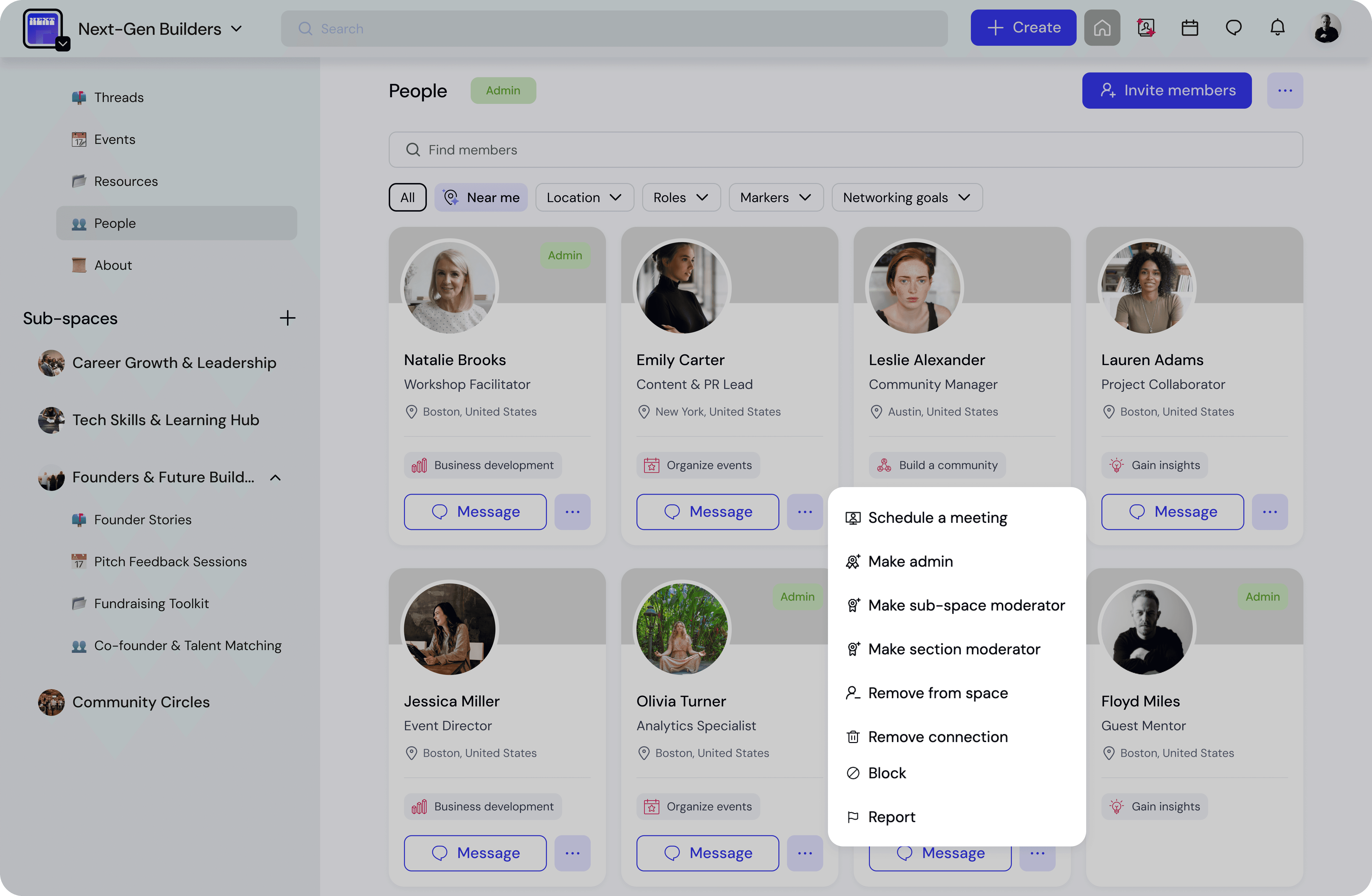
The selected role will be applied immediately.
This method is useful when you want to quickly update permissions while browsing member profiles.
Method 2 — From Manage Members
Roles can also be managed from the Manage members page in space settings.
Open Members → Manage members from the admin navigation.
Locate the member in the list.
In the Direct role column, click the dropdown menu.
Select the role you want to assign.
Example roles may include:
Admin
Member
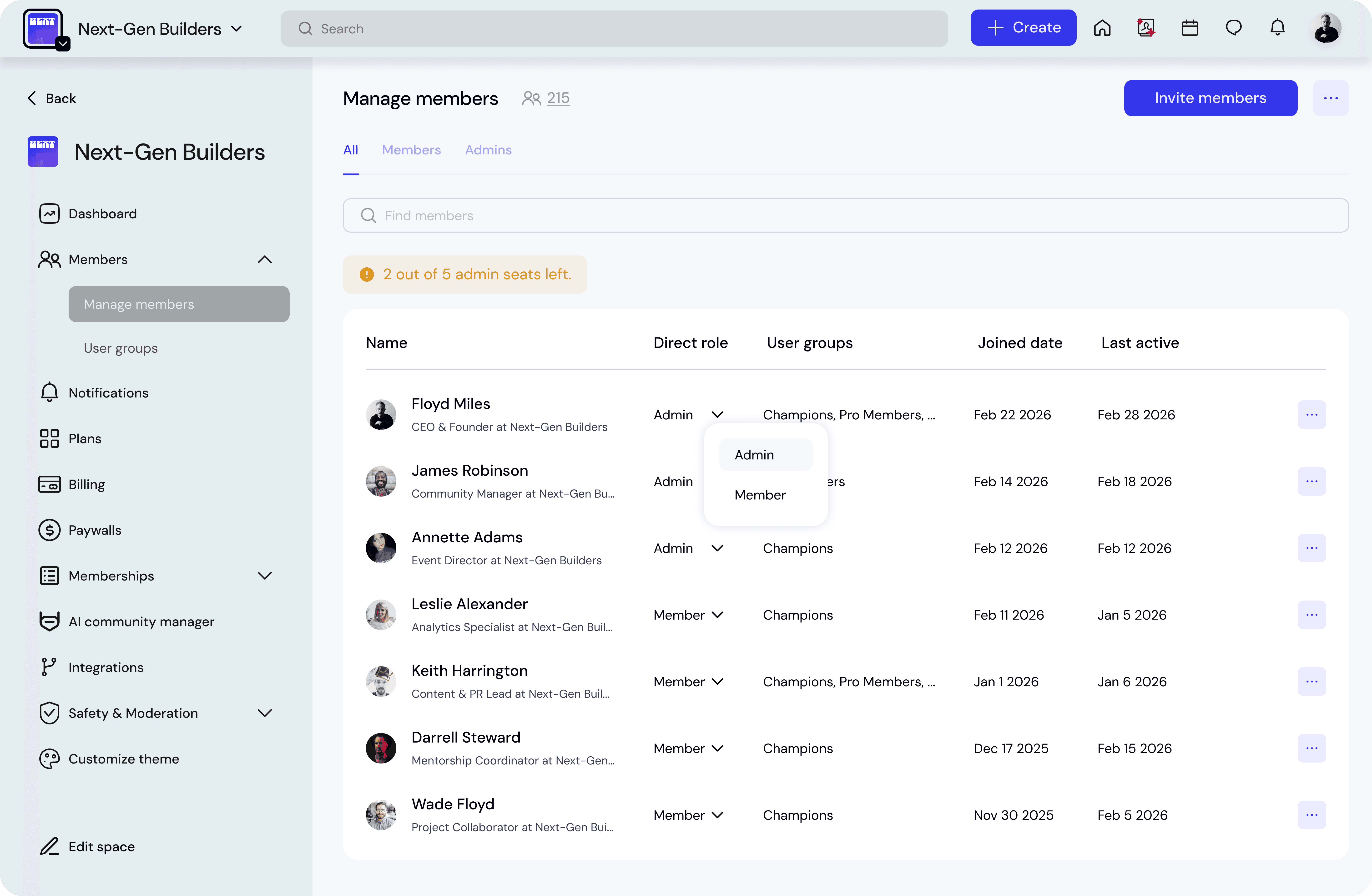
Changes take effect immediately once selected.
This method is useful for managing roles across multiple members in a structured list view.
When to Use Each Method
People page
Best for:
quick role changes
managing individual members
reviewing profiles before assigning roles
Manage members
Best for:
managing roles at scale
reviewing all members in one place
auditing permissions
Best Practices
Keep your role structure simple, especially when launching a new community.
A common setup includes:
1–2 Admins to manage the space
Moderators for active subspaces
Members as the default role
You can add more moderators or event hosts as the community grows.
💡 Tip
Assign moderator roles to trusted and active members who can help guide discussions and support the community.
Delegating moderation helps communities scale while maintaining healthy engagement.